
Client Secure File Transfer
Welcome to Bell & Company’s secure client file upload service. This internet-based technology is designed to give you a convenient and secure way to exchange information with Bell. It is a key component in our vision to continually improve the level of service we provide our clients.
Our online, secure client file transfer service allows you to safely and easily send your documents, data, and files to us. Files of any type (max of 3 GB), even those containing sensitive or confidential data, are protected and shared securely. Documents can be uploaded using a laptop, desktop, tablet, or mobile device. The document transfer is fully encrypted and safe to use.
How to Send Your Files
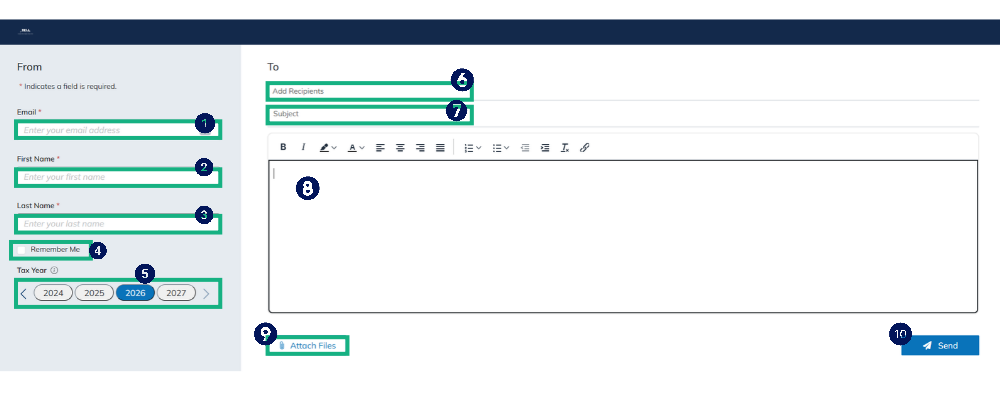
Enter your Email address.
Enter your First Name.
Enter your Last Name.
Click the Remember Me checkbox to have your email address and name auto-populate the next time you use a drop-off link.
Select the Tax Year that the documents are associated with.
Click the recipient field to select a different recipient(s).
Type a Subject for the message.
Type a Body for the message.
Click Attach File(s) to select the document(s) to upload OR drag them into the large message box below the “Subject” line.
Click Send.
Enter the access code sent to your email address (not required when uploading from the Client Portal).
Click Authenticate to send the document(s) to the firm.
Best Practices for Sending Files
Before sending files, collect ALL your documents – one upload is preferred.
Ensure the document is being sent to the correct Recipient. Click the recipient field to select a different recipient.
Click the “Attach File(s)” button to select your file(s) OR drag them into the large message box below the “Subject” line (limit use of photos (JPEGs, etc.)). The maximum amount of data that can be sent via a drop off link is 3GB.
After all your files are loaded, then click the “Send” button one time.